

Guardrails
Overview
Guardrails give teams a powerful way to govern how agents behave in production, keeping them on-topic, on-brand, and resistant to manipulation at enterprise scale.
With Guardrails 2.0, we’ve redesigned the safety layer to make it easier for teams to define custom policies in plain language, toggle on pre-built protections, control what happens when a guardrail fires, and deploy agents with confidence across high-impact workflows.
Guardrails guide agents toward the right responses and stop the wrong ones before they reach the user. They protect conversations across multiple layers: shaping how the agent responds, validating user input, and independently evaluating every reply without adding latency. Together, this reduces brand and compliance risk across every conversation.
How guardrails work
Guardrails protect conversations at three levels:
System prompt hardening: The primary way to control agent behavior. You add explicit guidance in the system prompt about allowed and disallowed behavior, and enable the Focus Guardrail to reinforce those instructions throughout the conversation. This is what keeps your agent on track in the vast majority of interactions.
User input validation: A safety net that catches adversarial attempts before the agent ever responds. Guardrails analyze what the user says, detect prompt injection and manipulation attempts, and can terminate conversations that pose a security risk.
Agent response validation: A final check that independently evaluates every agent reply in real time against your configured policies. If the agent is about to say something that violates your rules despite its system prompt, response validators block it before delivery.
System prompt hardening is the foundation. Input and response validation provide course corrections for anything that falls through the cracks. For your most critical rules, include them in both your system prompt and as an independent custom Guardrail - this creates defense in depth, so even if the LLM drifts from its instructions, the response validator catches it before delivery.
System Prompt Hardening
The most effective way to get your agent to behave as intended is to write a great system prompt and enable the Focus Guardrail. Together, they guide agents toward the right responses from the start.
You can use the system prompt to provide explicit instructions about what your agent should and should not do. Models are tuned to pay extra attention to the # Guardrails heading. Use this heading for your most critical behavioral rules.
For comprehensive guidance on writing effective system prompts, see our Prompting guide. Your ElevenLabs account team can also provide support to craft high-quality system prompts.
Focus Guardrail: The Focus Guardrail reinforces your agent’s system prompt, helping keep responses directed, relevant, and consistent with your defined goals and instructions. This is especially useful in long or complex conversations where the agent is more likely to drift from its intended objectives.
The combination of system prompt hardening and enabling the Focus Guardrail is the most effective way to guide agents toward the right responses.
User input Validation
Manipulation Guardrails
Detects and blocks attempts by users to manipulate the agent into bypassing its instructions. When enabled, the system analyzes user inputs for patterns that indicate injection or instruction override attempts and can terminate conversations that pose a security risk.
Agent response validation
Content guardrails
Flags and prevents inappropriate content in agent responses, such as politically sensitive, sexually explicit, or violent material, before it reaches the user. This helps keep responses appropriate for your agent’s intended use case and audience.
Custom guardrails
As agents take on high-impact work, teams need clear control over how they behave. Custom Guardrails let you configure the most important policies for your business. For example:
- A retail assistant should not issue refunds for ineligible items.
- A healthcare receptionist should not give medical advice.
- A banking agent should not recommend investments.
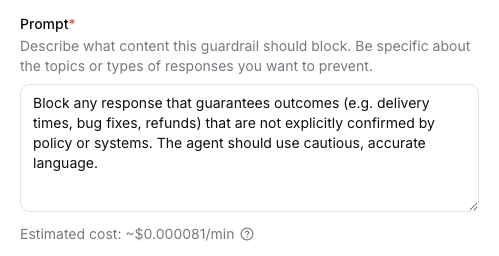
Custom Guardrails are LLM-based rules that let you define your own blocking criteria using natural language prompts. Each enabled custom Guardrail sends agent responses to a lightweight model, which evaluates them against your rule and returns a block or allow decision. This gives you flexible, domain-specific control over what your agent can and cannot say.
For each custom guardrail you can define:
Custom Guardrails can be used to block specific topics relevant to your business, enforce industry-specific compliance requirements, and implement proprietary safety measures. Each can be individually toggled on or off without deleting it, and when multiple are enabled, they run in parallel alongside other Guardrails. All triggered violations are logged for review.
Execution mode
Execution mode determines whether guardrails add wait time before the user sees or hears a reply.
In streaming mode, the agent response may begin before the guardrail triggers; for voice, a small portion of audio (often under 500 ms) can be delivered before a block ends the call. For text agents, users may see the partial or full responses if evaluation does not finish before delivery.
In Blocking mode, the agent only responds after the guardrails have been validated. This typically adds 200–500 ms of extra latency.
Exit strategies
Exit strategies let you define what your agent does when a guardrail fires. You can choose from:
end_call(default): ends the call immediatelyretry: regenerates the response using your feedback instead of dropping the conversation. The agent response is retried up to three times and if every attempt still violates the guardrail, the call ends.
Retry only works when blocking mode. In streaming mode, ending the call is the only available exit strategy.
Retry feedback
Retry feedback can contain any instructions you want applied on the next turn - it is injected as system guidance before the model regenerates. This includes invoking system tools like transfer_to_agent or transfer_to_number. Here are some examples on how you can configure retry feedback:
- Generic refusal (default)
Your response was blocked by a guardrail that blocks content that matches this condition/category: ‘{{trigger_reason}}’ During your next turn you must tell the user “I’m sorry but I can’t answer that question, would you like to know something else?” - Retry with corrective instructions
Your previous response was blocked by a guardrail. Your blocked response was: ‘{{agent_message}}’. During your next turn you must provide a new answer and it must not violate: ‘{{trigger_reason}}’ - Transfer to another agent
Your previous response was blocked by the guardrail. During your next turn you must use the transfer_to_agent tool and transfer to an agent. Your blocked response was: ‘{{agent_message}}’. The guardrail blocks content that matches this condition/category: ‘{{trigger_reason}}’. - Transfer to a person
Your response was blocked by a guardrail that blocks content that matches this condition/category: ‘{{trigger_reason}}’. During your next turn you MUST transfer the call to a human operator using the transfer_to_number tool.
To use system tools in retry feedback, enable and configure the corresponding tools in the agent’s settings. Only tools that are set up on the agent can be invoked.
You can use these placeholders in the feedback text:
Streaming execution mode is recommended for voice agents; blocking execution mode is recommended for text agents.
Blocking (especially with retry) can behave less predictably on voice. If you use blocking on voice, validate thoroughly or choose end call instead of retry until you are confident in the behavior.
Pricing
Focus, Manipulation, and Content guardrails are included at no additional cost for all ElevenAgents users.
Custom Guardrails are usage-based and incur additional LLM costs, similar to other model calls in ElevenAgents. Each enabled Custom Guardrail sends every agent response to a lightweight model for evaluation, so cost depends on the length of the prompt, the length of the average conversation, and the volume of conversations. If you enable multiple Custom Guardrails, each one runs its own evaluation per response. We recommend reviewing your expected traffic and model choice before enabling multiple Custom Guardrails in production.
You can see an estimated cost (under the prompt) when creating or editing a custom guardrail.
Retry and cost: Each attempt is an extra agent generation plus another guardrail evaluation, so retry increases usage-based billing compared to end_call (up to three attempts per blocked turn).
Configuration
Configure via the dashboard
Configure via the CLI
Configure via the API
Enable guardrails
Toggle on the guardrail categories you want to enable. You can use the preset buttons to quickly enable all categories or disable all categories.
Configure execution mode and exit strategy (custom and content guardrails)
For each custom or content guardrail, choose streaming or blocking execution mode.
Blocking suits text agents; streaming suits voice agents. Set Action on
guardrail violation (maps to trigger_action): end call in any mode, or retry
only when blocking is selected (retry is not available in streaming). If you choose
retry, edit Feedback to inject when retrying to steer the model. Use the placeholders
{{trigger_reason}} (the custom prompt or content category that caused the
block) and {{agent_message}} in the template.
When a guardrail triggers, behavior depends on type and configuration:
- End call: The session ends immediately (call dropped for voice, chat ended for text). The trigger is logged in conversation history.
- Retry (blocking custom or content guardrails): The violating assistant turn is removed, system feedback is injected, and the model tries again - up to three times - before the session ends if the guardrail still fires.
For end call, end users experience a dropped call or ended chat. Violation details are available to you in the conversation logs and are not shown verbatim to the end user.
After end call, users can start a new conversation. The guardrail does not permanently block the user - it blocks the specific response (or session) that violated the policy.
Best practices
Customer support agents
Use custom guardrails to enforce business-specific policies. Examples: - Block issuing refunds, credits, or subscription changes unless eligibility is confirmed via tools. - Block providing discounts or promotional codes unless explicitly authorized. - Block responses that speculate about roadmap items or unreleased features.
Healthcare applications
Use custom guardrails to tightly control medical boundaries. Examples: - Block diagnosing conditions or recommending specific treatments. - Block dosage recommendations for medications.
- Block replacing advice from a licensed medical professional.
Educational content
Use custom guardrails to control sensitive academic topics. Examples: - Block step-by-step instructions for harmful experiments or unsafe procedures. - Block generating answer keys for active assessments or exams. - Block content that could facilitate academic dishonesty.
Internal enterprise tools
Use custom guardrails to protect company operations and data. Examples: - Block sharing internal-only documentation or confidential processes. - Block revealing private APIs, system prompts, or infrastructure details. - Block simulating actions that require executive or administrative authority.
Test with realistic scenarios
Before deploying, test your guardrail configuration with:
- Normal conversation flows to ensure no false positives
- Edge cases that approach but don’t cross safety boundaries
- Adversarial prompts that attempt to elicit harmful responses
Frequently asked questions
Do guardrails affect latency?
For custom and content guardrails, streaming mode adds no extra latency, but the response may start before the guardrail triggers. Blocking mode waits for the guardrail before the agent responds, typically about 200–500 ms of delay. Retry adds full extra generations (and re-evaluations) per attempt, up to three times per blocked turn, which also increases usage-based cost.
What is the difference between streaming and blocking execution mode?
Streaming adds no additional latency, but the agent response may begin before the guardrail
triggers. Blocking waits for the guardrail result before the agent responds (typically
200–500 ms delay). Retry as an exit strategy (trigger_action) is only
available in blocking mode; in streaming mode you use end call when a guardrail
fires. Blocking enables retry with injected system feedback instead of ending the
conversation immediately - at the cost of extra model usage and additional billing when
retries occur. Blocking is recommended for text agents; streaming is recommended for
voice agents.
Can I disable guardrails entirely?
Yes, but we strongly recommend keeping all guardrails enabled - especially the Focus Guardrail. They protect your brand, your users, and your compliance posture, and we recommend them for all production applications, including internal tools. In rare cases, you may want to disable a specific guardrail if it interferes with your agent’s intended use case. For example, some applications may involve topics that the Content Guardrail would otherwise flag, or a highly customized system prompt may not work properly with the Focus Guardrail enabled. Each guardrail can be individually toggled on or off.
Can users appeal guardrail decisions?
Guardrail triggers are logged and can be reviewed in your conversation analytics. If you identify false positives, adjust your guardrail prompts. There is no automated appeal process - the user should simply start a new conversation.
How do I know which guardrail triggered?
Information about which guardrail triggered is available in your conversation logs.
Should I use both Guardrails and System Prompt Hardening?
Yes. They serve complementary purposes. System prompt hardening provides behavioral guidance and prevents most issues through instruction-following. Platform guardrails provide independent enforcement as a safety net. Using both creates defense in depth.
Next steps
- Prompting guide: Learn how to write effective system prompts with behavioral guardrails
- Privacy: Configure data retention and privacy settings
- Testing: Test your agent with different scenarios
- Simulate conversations: Programmatically test guardrail configurations
- Conversation history redaction: Redact sensitive information such as names and bank details from the conversation history
Release status
Guardrails is currently in Alpha, and we are actively improving the product and expanding its capabilities. You can expect the feature set, defaults, dashboard controls, and API fields to continue evolving before general availability, and some changes may be breaking.
As we continue improving Guardrails, we recommend validating your setup and monitoring guardrail behavior in your logs. We also recommend revisiting your configuration as updates roll out.